
What Is NFC?
NFC (Near Field Communication) is a wireless technology that allows smartphones and NFC-enabled devices to communicate when placed close together. NFC technology is commonly used for contactless payments, digital business cards, smart sharing, instant website access, and quick information transfer.
With an NFC business card, users can instantly open:
- Digital business profiles
- Contact details
- Websites
- Social media links
- Portfolios
- Payment links
- Online booking pages
simply by tapping their smartphone on the NFC card.
NFC business cards provide a modern, contactless, and professional networking experience without requiring a mobile application.
How To Use an NFC Business Card
Using an NFC business card is simple and fast.
Step 1
Unlock your smartphone.
Step 2
Place the NFC card near the back of the phone.
Step 3
A notification will automatically appear on the screen.
Step 4
Tap the notification to instantly open the digital profile or shared information.
NFC business cards work instantly on most modern smartphones.
NFC Reader Location on Smartphones
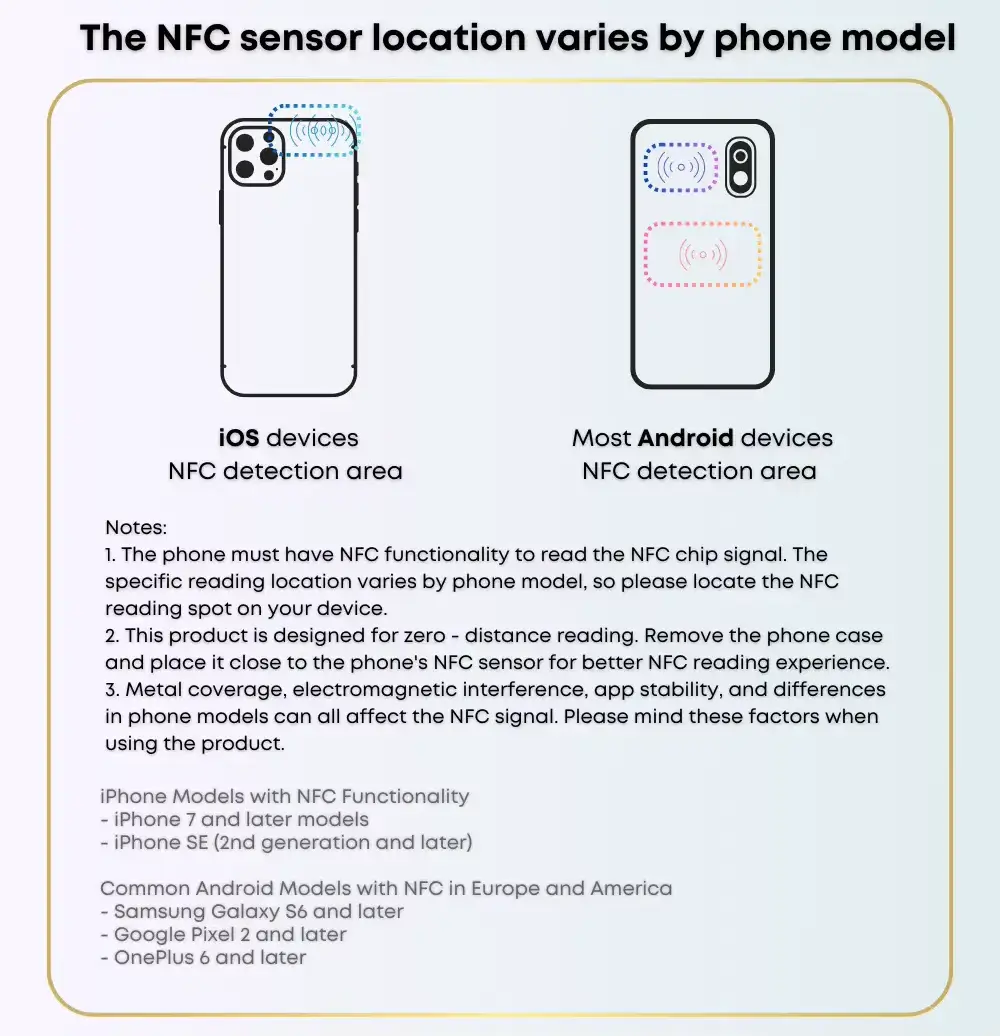
NFC on iPhone Devices
Most modern iPhones support NFC technology automatically without requiring additional setup.
Where To Tap on iPhone
Place the top back area of the iPhone near the NFC card, close to the camera section.
Supported iPhone Models
NFC business cards are supported on:
- iPhone XR
- iPhone XS
- iPhone 11
- iPhone 12
- iPhone 13
- iPhone 14
- iPhone 15
- Newer iPhone models
NFC on Android Devices
Most modern Android smartphones support NFC technology and contactless NFC business cards.
Popular Supported Android Brands
- Samsung
- Google Pixel
- Huawei
- Xiaomi
- OnePlus
- Oppo
Where To Tap on Android
Place the center or upper back area of the smartphone near the NFC business card.
How To Enable NFC on Android
Some Android devices may require NFC to be enabled manually.
Samsung
Settings → Connections → NFC and Contactless Payments → Enable NFC
Google Pixel
Settings → Connected Devices → Connection Preferences → NFC → Enable NFC
Xiaomi
Settings → Connection & Sharing → NFC → Enable NFC
NFC Business Card Troubleshooting
If Your NFC Card Is Not Working
Try the following steps:
- Ensure the smartphone is unlocked
- Move the NFC card slowly around the back of the phone
- Remove thick phone cases if necessary
- Make sure NFC is enabled on Android devices
- Hold the NFC card steady for 1–2 seconds
- Test the card with another NFC-enabled phone if possible
Most NFC reading issues are caused by incorrect tap positioning or disabled NFC settings.
Benefits of NFC Business Cards
NFC business cards provide a faster and smarter networking experience.
Key Benefits
- Instant contactless information sharing
- No mobile application required
- Compatible with most modern smartphones
- Fast and professional networking solution
- Easy sharing of digital profiles and links
- Eco-friendly alternative to paper business cards
- Modern smart business card technology
- Easy profile updates without reprinting cards
NFC business cards are becoming the future of digital networking and contactless business communication.
Quick NFC Instructions
For iPhone
Tap the top back area of the iPhone on the NFC card.
For Android
Tap the center back area of the Android phone on the NFC card.
Why NFC Business Cards Are the Future
Traditional paper business cards can become outdated, lost, or discarded quickly. NFC business cards offer a smarter and more modern networking solution by combining digital technology with instant sharing capabilities.
Professionals, businesses, creators, and brands are increasingly switching to NFC business cards because they provide:
- Better networking experiences
- Faster contact sharing
- Premium presentation
- Smart digital connectivity
- Modern branding advantages
The future of networking is contactless, intelligent, and powered by NFC technology.